DC‑MPSG9‑32 Slave Unit
8‑bay Slave Docking Unit
8‑bay Slave Docking Unit
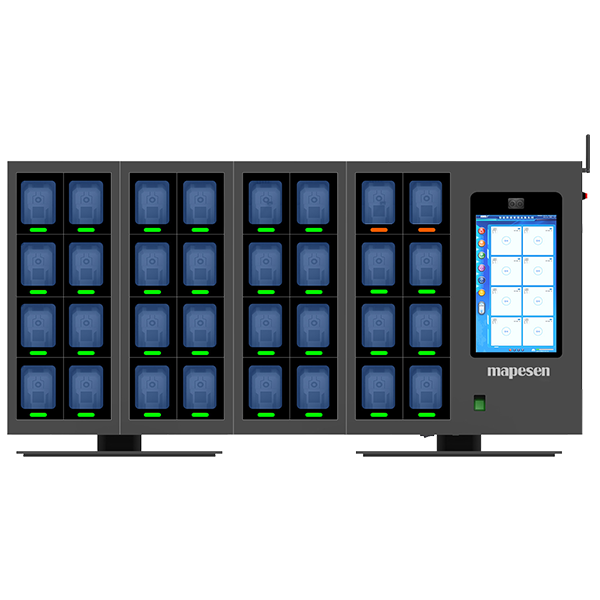
| Model Number | DC‑MPSG9‑32 Slave Unit |
| Specification | |
| Appearance & Structure | Modular assembled structure with sheet metal fabrication; constructed from 1.2mm cold-rolled steel plate, pickled and coated with anti-static paint. |
| Installation Method | Supports wall-mounted and desktop installation, equipped with installation brackets. |
| Dimensions | Main unit:530*605*165mm, Slave unit:268*605*165mm |
| Display Screen | 14-inch LCD screen |
| Touch Screen | 14-inch capacitive multi-touch screen |
| Resolution | 1920*1080 |
| Number of Docking Ports | Independent visible compartment doors. The main unit supports simultaneous data collection for 8 body worn cameras; each slave unit supports another 8 units. Up to 3 slave units can be connected, enabling simultaneous collection for a maximum of 32 body worn cameras. |
| Port Specification | Heavy-duty retractable spring cables, compatible with Mini USB, Type-C and Micro USB interfaces. |
| Mainboard | Industrial integrated motherboard |
| Processor | Intel Core i5-4130M, dual-core four-thread, base frequency 3.4GHz |
| Memory | DDR3 8G |
| System Disk | SSD 128G |
| Storage Disk | Standard: 4TB surveillance-grade hard disk; maximum expandable to 60TB |
| Hard Disk Bays | 3bays |
| Power Supply | DC12V 16.5A 200W |
| Speaker | 8Ω 5W |
| Expansion Interfaces | USB2.0*2 |
| Network Port | RJ45 Gigabit Ethernet |
| Face Recognition | 2MP binocular camera, 1080P, built-in face recognition algorithm |
| Fingerprint Recognition | Optical fingerprint sensor, supports storage of up to 1,000 fingerprints |
| Compartment Door Status Monitoring | Monitors open/closed status of compartment doors |
| Alarm Function | Supported |
| WIFI | 2.4G |
| Status Indicator | Dual-color red/green LED indicator |
| Operating System | Windows 7/Windows10 |
| System Software | Body Worn Camera Data Collection & Management System V20 |
| System Functions & Applications | |
| Flexible Deployment | Modular assembled structure. Users can select 8-channel, 16-channel, 24-channel or 32-channel configurations as required. Wall-mounted and desktop placement are both available for greater flexibility. |
| Automatic Data Collection | Data collection starts automatically once a body worn camera is docked. Data is classified and stored by police ID, device ID and collection date, and bound to the corresponding police officer. |
| Concurrent Charging & Collection | Supports simultaneous data collection and charging for 8 / 16 / 24 / 32 body worn cameras. |
| Collection Status Monitoring | Independent signal light for each smart compartment: yellow during data collection, green upon completion. |
| Independent One-to-One Compartments | Separate compartment doors. Each user is assigned an exclusive compartment, which can be unlocked via face recognition, fingerprint or password for storing and retrieving cameras. Administrators have access to open all compartments. |
| Smart Compartment Status Detection | The system automatically identifies open/closed status of compartment doors. |
| Door Timeout Alarm | The system triggers an alarm if any compartment door remains open for an excessive period. |
| Face Recognition | Pre-enroll user facial data; face, fingerprint or password authentication unlocks compartments and enables data inquiry. |
| Finger Recognition | Pre-enroll user fingerprint data; fingerprint, face or password authentication unlocks compartments and enables data inquiry. |
| Status Indicator Lights | Blue light = data in progress; green light = collection completed; light off = no camera docked. |
| Information & Status Display | Each docking port has an assigned number.If no camera is connected, the system marks the port as idle.After a camera is plugged in and recognized, the interface automatically displays the user ID, device ID, username, department, real-time collection progress, battery level and total data size of the camera. The system also displays total storage capacity, system time, network status and working mode of the docking station. |
| System Log / Operation Traceability | The system automatically generates operation logs for audit and traceability. |
| Automatic Data Rotation & Overwrite | Administrators may configure data retention cycles. Expired data will be automatically deleted or overwritten. Marked important files are exempted from automatic deletion or overwriting. |
| Compliance with Industry Standards | The docking station charges body worn cameras during data acquisition. It automatically detects and displays battery levels for cameras complying with GA/T 947-2015 Single Police Law Enforcement Video and Audio Recorder. |
| Hard Disk Switch Management | When one hard disk reaches full capacity, the system automatically switches to the next disk to realize automatic storage expansion. |
| Body Worn Camera Compatibility | Supports all recorder brands and models that meet GA/T 947-2011 Single Police Law Enforcement Video and Audio Recorder. |
| Automatic Time Synchronization | The system automatically calibrates the internal clock of docked cameras during data collection and charging to ensure accurate timestamps. |
| High-Speed Data Upload | When multiple or up to 16 cameras collect data simultaneously, the single-unit collection speed reaches 8MB/s. |
| Priority Upload | Priority collection can be activated for selected cameras in emergency scenarios, with single-channel speed up to 15MB/s for rapid data upload. |
| Data Retrieval | Users can log into personal accounts to view, tag, download and delete videos, audio files, photos and logs. |
| Voice Announcement | Voice prompts will be triggered at the start and completion of data collection as well as for other system operations. |
| Physical Position Mapping | Software docking list corresponds one-to-one with physical compartments for easy camera identification. |
| File Tagging | Users can tag uploaded files with classification levels: Normal, General, Important, etc. |
| Storage Full Alarm | Automatic alarm when storage hard disk is full. |
| Network Abnormality Alarm | Automatic alarm upon network disconnection or communication failure. |
| Body Worn Camera Binding & Registration | Two registration modes are optional: Manual Registration and Automatic Registration.Manual Mode: When a camera is connected, the system reads its device ID and police ID and checks binding status. Unregistered devices require administrator authorization for binding.Automatic Mode: If the camera is unregistered, the system automatically completes allocation and binding upon docking. |
 mapesen
 mapesen