Non-sensing Facial Recognition Attendance System Solution

Contactless Attendance Project Background

The current traditional attendance systems suffer from multiple pain points, including crowded queues for clocking in, slow processing, forgotten punches, low efficiency, and poor user experience.
Forgetting to Clock In/Out

(Rushed commutes lead to missed clock-ins/outs)

Queuing for Clock-in,Congestion,and Low Efficiency.

(Slow attendance processing with employee queueing for clock-in.)

Poor User Experience

(Forgetting access cards,Failed fingerprint scans in winter)

Proxy Attendance

(Colleague-assisted Proxy Clock-in/Out)

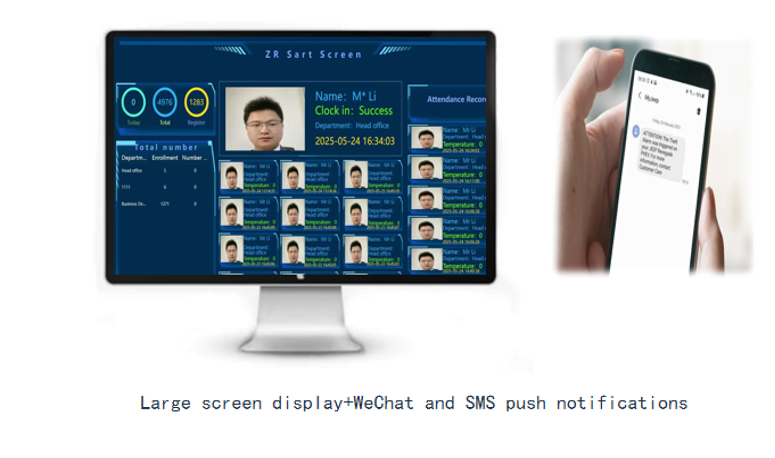
No Alerts/Notifications

(Absence of Attendance Confirmation Alerts)

    Queuing for Clock-in,Congestion,and Low Efficiency.

    (Slow attendance processing with employee queueing for clock-in.)

    Queuing for Clock-in,Congestion,and Low Efficiency.

    (Slow attendance processing with employee queueing for clock-in.)

    Poor User Experience

    (Forgetting access cards,Failed fingerprint scans in winter)

    Proxy Attendance

    (Colleague-assisted Proxy Clock-in/Out)

    No Alerts/Notifications

    (Absence of Attendance Confirmation Alerts)
Contactless Attendance Project Objectives

The current traditional attendance systems suffer from multiple pain points, including crowded queues for clocking in, slow processing, forgotten punches, low efficiency, and poor user experience.

Contactless Attendance System Overview

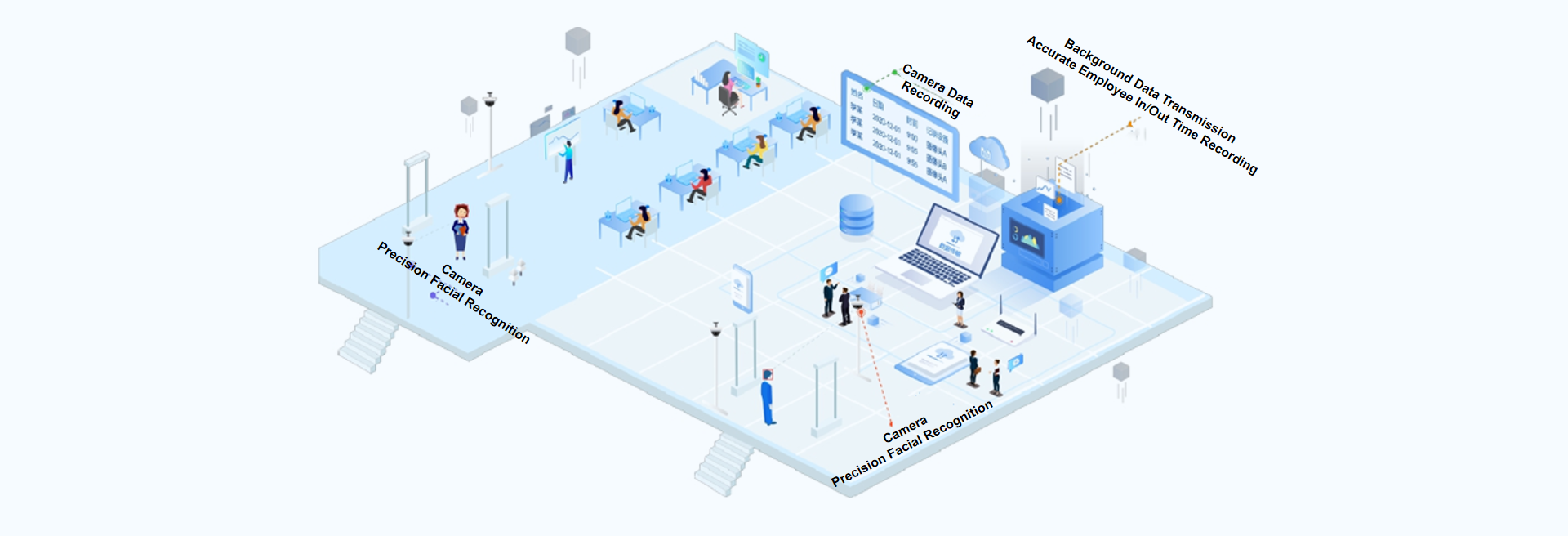
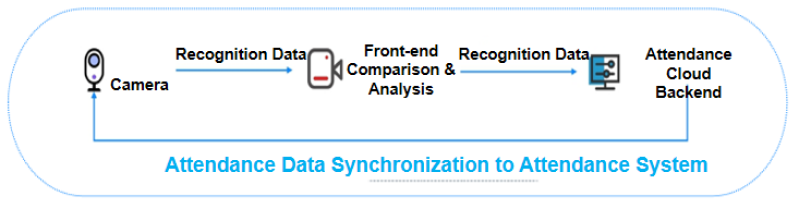
The Contactless attendance system adopts intelligent AI recognition algorithms. Through front-end comparison camera hardware devices, it captures and compares for identification. Users can maintain personnel information and profile photos on the SaaS platform, and the system synchronizes the data to the contactless facial recognition cameras. Users naturally pass through the recognition zone to complete attendance check-in without deliberate cooperation. The devices automatically perform comparison and identification, then output the results to the backend server.

Ultimate User Experience Optimization & Value Creation! Maximize Check-in Efficiency!

· No manual clock-in required, automatically records employee entry/exit
· Supports multi-camera networking for seamless, blind-spot-free recognition
· Long-range contactless attendance with up to 15-meter identification distance
· Video surveillance capability for remote real-time monitoring
· Tracks employee presence/absence, providing data foundation for workforce management
· Intelligent system integrating "HR attendance + device management + data sync" to eliminate data silos
· Combines cameras with attendance cloud platform

Contactless Attendance System Introduction

Characteristics of the Sensor Less Check in Program

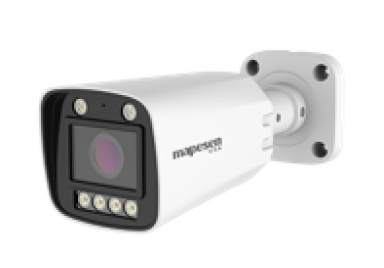
Camera

No need to deliberately clock in, automatic recognition and recording of employee entry and exit

Auxiliary Equipment

Support multi camera interconnection to achieve blind spot and seamless recognition

Attendance Cloud Platform

Personnel on and off duty records provide a data foundation for enterprise employee management and assessment

Contactless Attendance System Introduction

SAAS Attendance System Attendance Results

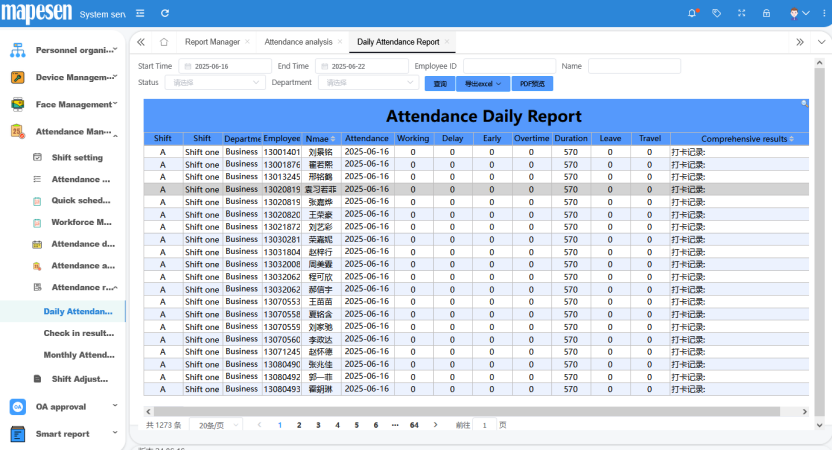
The SaaS attendance software provides both predefined report templates with customizable layouts and a custom report designer to create tailored reports based on specific user requirements.

Standard Reports

  • Today's Unclocked Employees List
  • Employee Attendance Status Report
  • Daily Attendance Report
  • Daily Attendance Exception Report
  • Attendance Compliance & Non-Compliance Summary
  • Attendance Summary Report
  • Overtime vs. Overtime Request Comparison Report
  • Monthly Employee Attendance Exception Log

Custom Reports

Custom reports support functions including import, export, preview, add, modify, delete, and design. Additionally, editing permissions can be set for each report, such as execute, add, modify, and delete, with further granular control down to individual items within the report.

SAAS Attendance System Basic Data Setup

Basic Shift Configuration

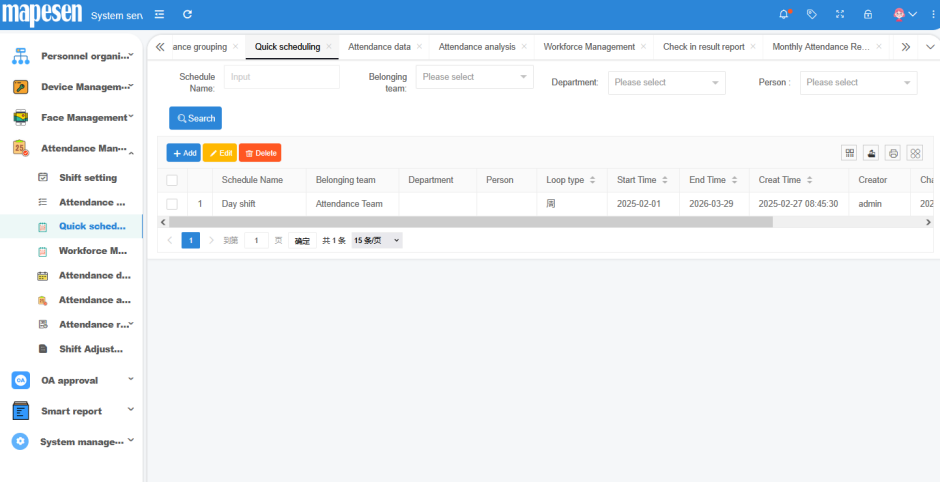
Basic shifts are the smallest units for scheduling, such as day shift, swing shift, and night shift. The system comes with two preset shifts: blank shift and rest shift. For employees, both blank shift and rest shift mean no work is required.

Rest Shift
If a day is designated as a "Rest Shift", the system will recognize it as a full-day off. Any work performed on such days will automatically be classified as overtime, with the overtime type defaulting to the system's predefined overtime category.
Blank Shift
For "Blank Shifts", the system comprehensively determines an employee's attendance and overtime status for that day by factoring in holidays, weekly rest days, and overtime authorizations.
Each basic shift in SAAS software is divided into six time periods. The first, third, fifth, and sixth periods are default overtime periods, the second and fourth periods are default regular periods, and the third and fifth periods can be set as regular periods. In summary, each shift can have up to four overtime periods and four regular periods. For clarity, the six shift segments can be mapped to specific time intervals throughout a day. A typical daily work schedule can be illustrated as follows:
  • The purpose of shift scheduling is to clearly define for each individual, on every single day, whether it's a day off, what shift they are assigned to, and what type of overtime (if applicable) applies.
  • The definitions of department scheduling, team scheduling, holiday schemes, and similar concepts are merely part of the scheduling process—all aimed at reducing complexity and improving efficiency in shift planning.

Scheduling Management

Shift scheduling is the most critical step in an attendance system. Whether the schedule is well-designed plays a vital role in both scheduling efficiency and the smooth operation of the attendance system. Shift Management Center can handle shift scheduling, shift swaps, attribute modifications, attribute copying, work mode configuration, and holiday settings, among other functions.

Traditional Attendance System

Traditional attendance systems typically schedule shifts by group or department, with holiday policies defined separately. This approach often makes shift adjustments and holiday modifications cumbersome and inefficient.

Traditional Attendance System

Traditional attendance systems typically schedule shifts by group or department, with holiday policies defined separately. This approach often makes shift adjustments and holiday modifications cumbersome and inefficient.

SAAS Attendance System Basic Data Setup

01

Review

Attendance documents/slips subject to review requirements are only valid upon approval.

02

Cancel Review

Once an attendance record is approved, any subsequent changes will require revoking its approval, rendering the document invalid.

03

View Content

Select the attendance record you wish to view, then double-click to switch to the original document browsing interface.

04

Review All

If the attendance records are confirmed to be accurate, you can approve all unapproved documents at once.

05

Other Functions

Beyond approval and viewing functions, additional features include combined sorting, queries, grid display settings, and export to Excel.

SAAS Attendance System Data Analysis

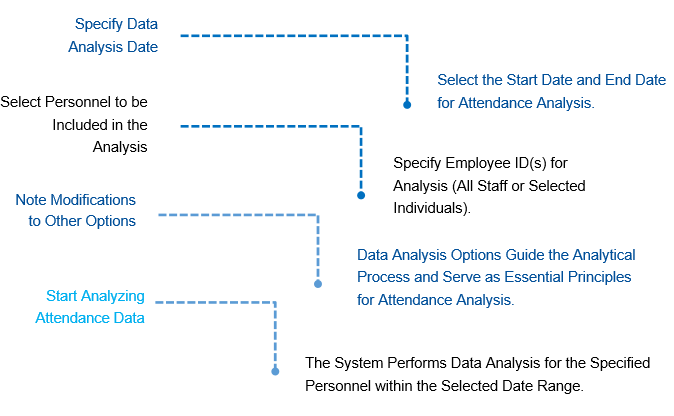
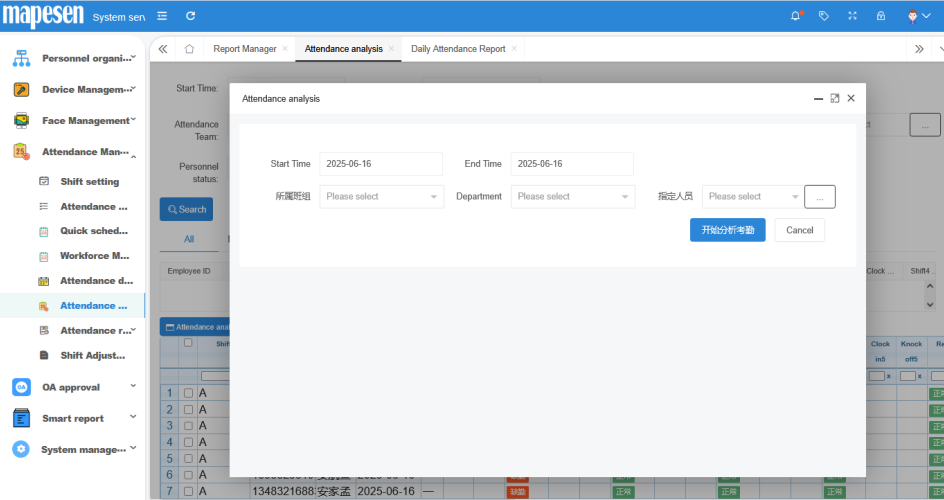
Data analysis is used to compare "personnel clock in data" with "basic shift", calculate attendance data such as the number and minutes of lateness and early departure, regular shift time, overtime time, etc., to determine whether attendance data is abnormal. It is a necessary operation item for calculating attendance in the SAAS system attendance module, and the attendance results after analysis and maintenance are the basis for "attendance salary transfer".

SAAS Attendance System Advantages

Simplified operation with powerful functionality, delivering industry-leading processing speed among competing software.
Time is uniformly represented in integer seconds, featuring our innovative 72-hour workday system that delivers ultra-fast processing while fundamentally eliminating cross-day shift errors.
The 'Daily Attributes' concept permeates the entire attendance process, encompassing shift scheduling, holiday definitions, overtime types, and more - granularly implemented per employee per day, enabling realization of even the most complex scheduling scenarios.
Efficient shift scheduling, shift swapping, and shift package features make light work of even the most laborious tasks.
Comprehensive transaction and document management seamlessly integrates with our SaaS client software for online form submission, workflow routing, and approval processes.
Featuring our patented attendance diagnosis function, the intuitive interface clearly visualizes anomaly causes while displaying all contributing factors - enabling operators to immediately correct issues through compensatory clock-ins/document amendments in the same workflow.
Provides a dedicated exception handling module that displays attendance anomalies by day, week, or any custom time period. Operators can directly jump to the attendance diagnosis interface for daily error correction or perform batch corrections.

SAAS Attendance System Data Analysis

Typical Cast Study

Typical Cast Study — Lens Technology
Typical Cast Study — Shenzhen Kaifa